
One link, everywhere you already are
The same booking link works in your Instagram bio, your Google profile, a QR code in the window, or your site. Clients do not need to install anything to book.
Set up your profile's booking link →Online booking for barbershops
Share one booking link. Your client picks the service, picks the barber, and takes a real open time from that barber's own hours—no calls, no back-and-forth, no double-booked chair.
For every barbershopBookings, barbers, clients, walk-ins, and inbox included


Step 1 of 4
Step 2 of 4
Step 3 of 4
Only times Marcus can actually take—his hours, his days off, and the buffer on this service are already applied.
The chair is held in your calendar. Clients can view, reschedule, or cancel in the free HiOla app.
Open the shop for booking in an afternoon
Choose the barber shop preset when you create your workspace and the setup is mostly confirming what is already there.
Download the app and pick the barber shop preset. Your workspace opens with a barber service menu already built—haircut, beard trim, haircut and beard, kids haircut.
Set your own prices and real durations, add each barber, and give every chair its weekly hours, days off, and the services that barber performs.
Drop it in your Instagram bio, your Google profile, a QR code on the mirror, or your website. Clients book from any phone browser.
Built for how a shop actually runs
A barbershop does not sell an hour. It sells a fade that takes 45 minutes, from a specific barber, with time to sweep up before the next head.
The same booking link works in your Instagram bio, your Google profile, a QR code in the window, or your site. Clients do not need to install anything to book.
Set up your profile's booking link →Weekly hours, days off, and schedule exceptions per chair. Clients can request a specific barber or take whoever is open first.
Booking setup for individual chairs →Each service carries its own length, price, and buffer, so a 60-minute cut and beard never lands on top of the next appointment.
Client records keep history and notes with the appointment. Clients who use the free HiOla app can receive appointment reminders; an app is not required to book.
Inside the owner's app
Your clients use the booking link. Your team uses HiOla Business to see appointments, client details and the barbers available that day.
New to online booking? Follow the chair-by-chair setup guide, then open your booking link to check what clients will see.
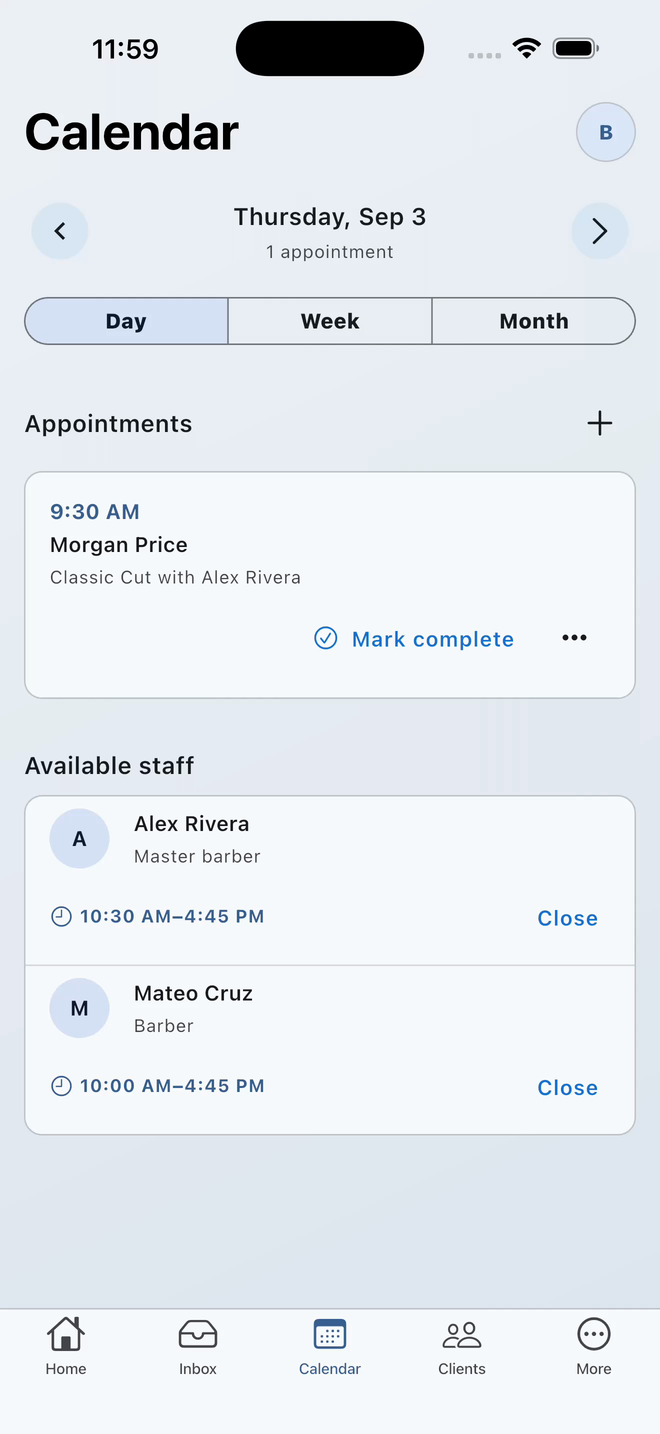
Barber shops only
Someone walks in during a rush. The front desk adds their name, the service, and the barber they asked for. The queue is ordered by the time they actually joined—no paper list, no arguing about who was first.
It is an opt-in tool your team manages at the shop. Turn it on only if you truly take walk-ins.
This is deliberately not a remote waitlist, and it will never show a client a wait time your shop cannot keep.
Ordered by real join time. An owner, manager, or receptionist moves people to the chair.
One chair or a full floor
Built for shops that live on repeat clients and a schedule that has to hold up on a Saturday.
Make it work for your shop
Set up the booking workflow you actually need, whether you rent one chair or manage a busy front desk.
Choose an independent or shared workspace, set services and hours, and check availability before sharing.
Give clients the booking page, not an app-store URL. See what to check and what clients do next.
Record arrivals, keep visit statuses current, and check the calendar before seating the next client.
Straight answers
Yes. Bookings, your service menu, your barbers, client records, the shared inbox, and the walk-in queue are included at no cost.
No. Your booking link opens in any phone browser. Clients who want reminders and the ability to reschedule or cancel on their own can use the free HiOla app, but it is not required to book a chair.
Yes. Each barber has weekly hours, days off, schedule exceptions, and their own set of services. The booking link only offers times that barber can actually take.
Barber shops can switch on a walk-in queue that the front desk manages in the app. People are ordered by the time they actually joined the queue. It is deliberately not a remote waitlist and it never promises a wait time you cannot keep.
Anywhere a client already finds you: your Instagram bio, your Google profile, a QR code taped in the window or on the mirror, or your own website.
Need help setting up your shop? Contact HiOla Business support.
Free for barbershops.
Download the HiOla Business App, create your shop, and share your booking link before your next client sits down.